
Frequently Asked Questions
Please read our FAQs to find a quick solution to any problems you might be facing 🙂
I’ve lost my login details. How do I find them?
When you signed up, we sent your login details to your inbox. Please search for the email titled:
‘Welcome to Options AI’. Inside you’ll find details of your username and login link to access Options AI.
If you can’t find it, check your spam folder or promotions tab. Sometimes our emails end up there. If you still can’t find it, please check any other email accounts you may have. In case you signed up with a different email address.
Alternatively, please login via our homepage: www.optionsapp.com and tap LOGIN in the top right corner.
I’ve forgotten my password. How do I change it?
If you’ve forgotten your password, you will find a link to reset your password on the login page. Navigate to www.optionsapp.com/login. On this page you’ll find the link to reset your password:

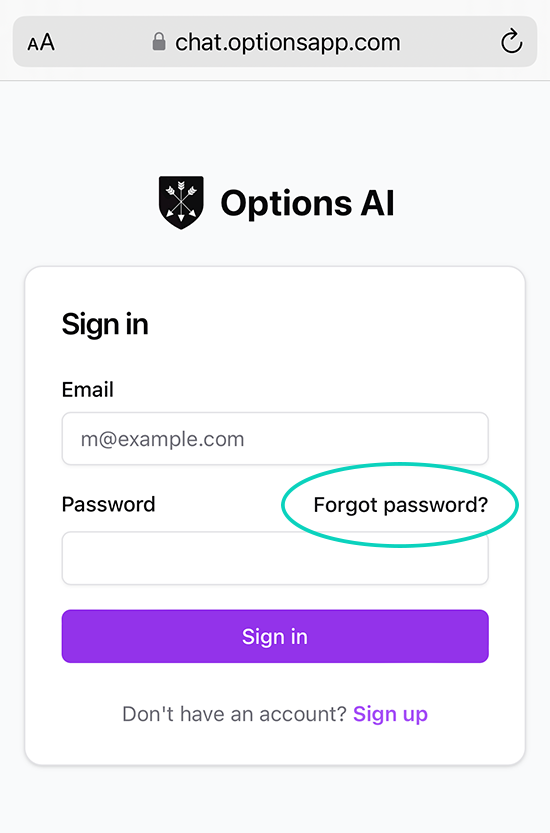
You can also change your password on the App via the ‘My Account’ page. Simply navigate to My Account -> Change Password. Scroll down the page and you can update your password at anytime.
How can I access the App. I keep forgetting the url link?
The url to access Options AI is: chat.optionsapp.com
To access the app more easily, follow these two steps:
1. After logging into the app, tap the  menu button. Or, on Android tap the
 three dots.
2. Tap ‘Add Bookmark’ or ‘Add to Favourites’
Once you’ve added Options AI to your favourites, you can easily access it via your web browser. For example in Safari:

Or alternatively, if you want Options AI to appear as an App on your phone’s home screen, tap ‘Add to Home Screen’:
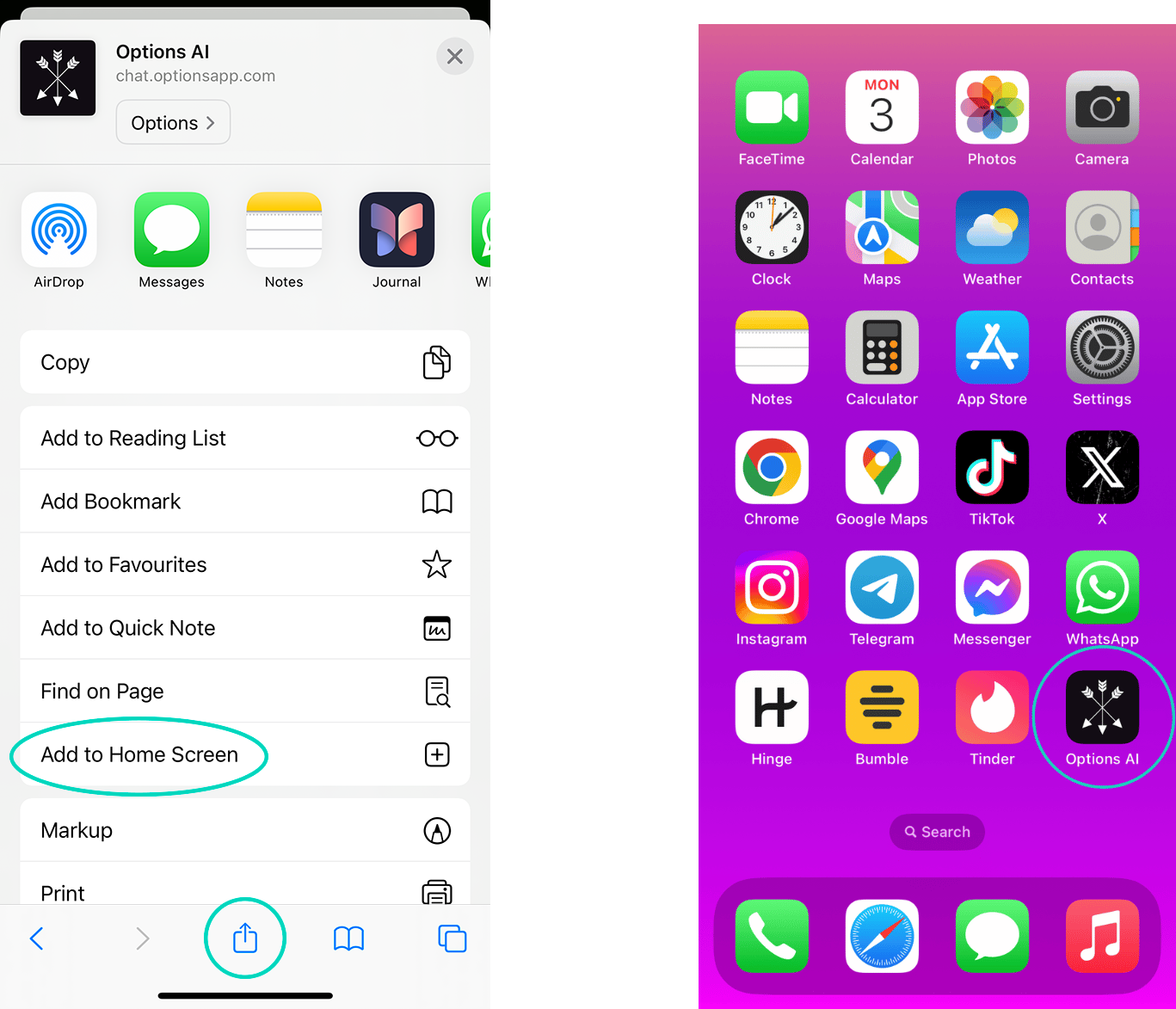
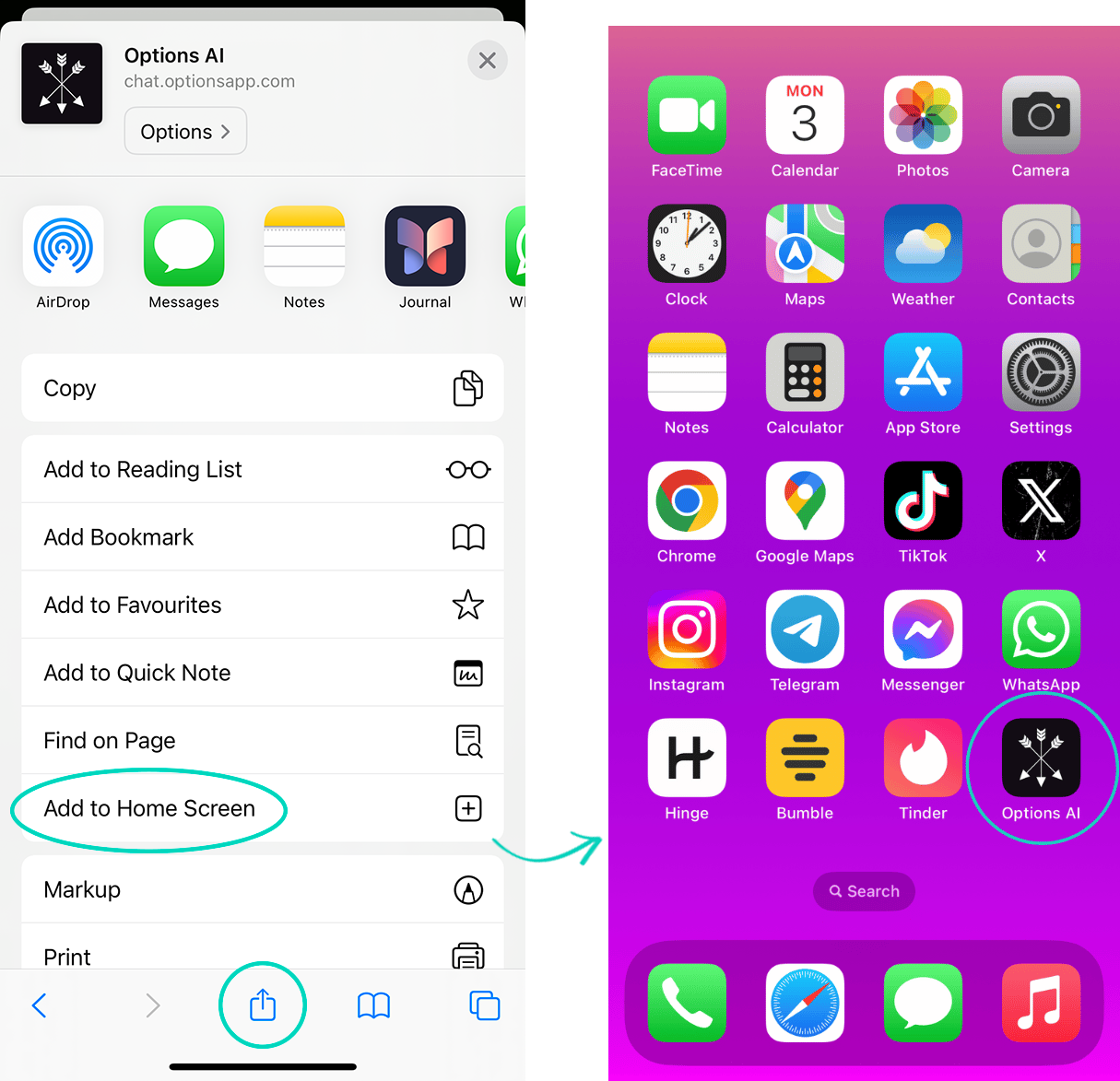
If you don’t see Add to Home Screen, scroll down to the bottom of the list, tap ‘Edit Actions’, then tap + ‘Add to Home Screen’.
Is Options AI just ChatGPT with a different name?
No, and this matters.
Generic AI gives generic advice. Ask ChatGPT what to text a girl who’s gone cold and it’ll usually tell you to “be honest,” “communicate openly,” or “share your feelings.” That’s exactly the kind of polite, neutered, Mr Nice Guy messaging that quietly kills attraction.
Options AI is built on the entire Options system. It knows Rainy and Summer. It knows the 9 traits of a man with options. It knows when to send a Ghost Buster, when to ask her out, and crucially – when to send nothing at all.
It also remembers every girl you’re texting. It builds a profile for each conversation, remembers her personality, what she’s responded well to in the past, your history together, and the details you’ve already shared – so you don’t have to start from scratch every time you ask for help.
It’s the difference between asking your slightly awkward HR rep for dating advice, versus asking a wingman who’s seen this exact situation a thousand times.
Normally, Options AI costs $39/month as a standalone app. But if you’re an Academy member, you receive full, unlimited access included with your membership.
Is Options AI included with my Academy membership?
Yes. Academy members receive full, unlimited access to Options AI at no additional cost as part of their membership.
That means you’ll always have your personal AI wingman available for 24/7 situational support, along with the monthly Academy coaching videos, live webinars, and future content releases.
If you’re not an Academy member, Options AI is available separately for just $39 USD per month.
Like all premium AI platforms, Options AI has ongoing operating costs every time it’s used. We’ve kept the monthly price as low as possible so more men can benefit from having a personal AI wingman whenever they need one. 🙂
How do I cancel my subscription?
The cancellation process depends on the type of subscription you have.
If you purchased the $27 OPTIONS Texting System offer:
Your purchase also includes a 14-day trial of Options Academy, which gives you 5+ hours of dating skills video training every month, plus full access to the Options AI app. After your 14-day trial, your Academy membership continues for $39 USD/month, billed every 30 days until you cancel.
Your subscription is managed by our support team, rather than through the “Manage Subscription” button inside the app.
Simply email: support@optionstexting.com from the email address associated with your account and let us know you’d like to cancel. And we’ll cancel your subscription and confirm by email.
Please note: When your Options Academy subscription is cancelled, your access to Options AI will end immediately. You will no longer be able to access the AI or submit prompts from that point onward. You will, however, keep access to the Academy training videos you’ve already received.
If your latest $39 monthly payment has already been processed and you’d like to continue using Options AI for the remainder of your current billing period, we recommend waiting until near the end of that period before requesting cancellation.
To cancel before your next $39 payment, please email us at least 24 hours before your next billing date. Your subscription is billed every 30 days from your most recent billing date.
If you cancel during your 14-day trial, you will not be charged the recurring $39 monthly payment.
Cancelling Options Academy does not affect your access to the OPTIONS Texting System course. You have lifetime access to that 🙂
If you have an Options AI app-only subscription:
If you subscribed to Options AI as a standalone app subscription, you can manage and cancel your subscription directly inside the app.
Simply navigate to:
My Account → Manage Subscription
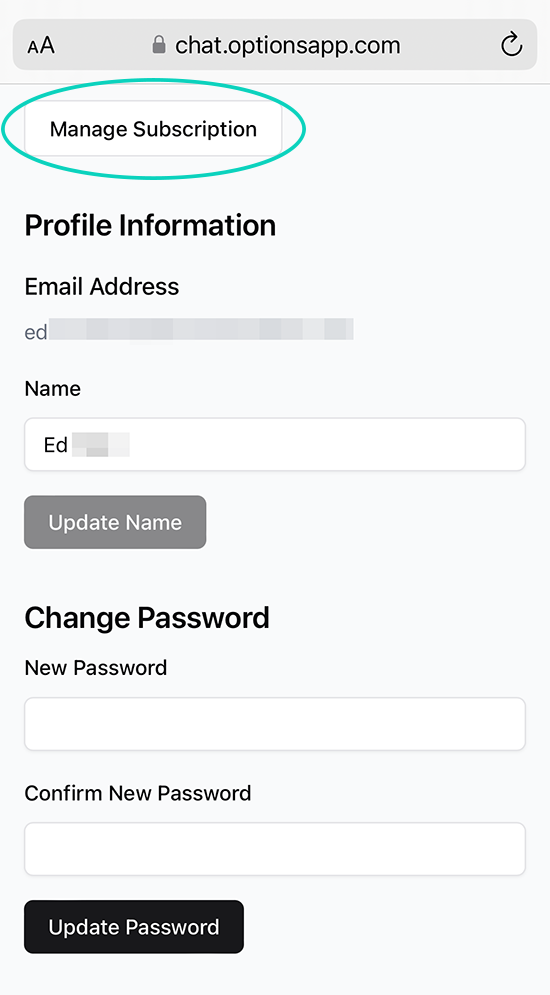
From there, follow the instructions to cancel your subscription.
Not sure which subscription you have? Just email support@optionstexting.com and we’ll check your account and help you cancel.
Can I upload dating app bios or profile pic screenshots of my matches?
Dating App profile images and bio’s are not compatible. This app is exclusively for text screenshots. If you need help crafting a first message after matching with a girl on a Dating App, simply tell the AI what you see in her photos or bio – interests, hobbies, or anything unique about her you want to mention in the first text.
For the best examples of how to do this, check out the quick start guide here.
The screenshot upload function didn’t display all the texts from my image?
Depending on what messenger or dating app you’re using, some apps like WhatsApp and IG have a ‘down’ arrow to return to the most recent message. When you’re taking screenshots, this down arrow might occasionally get in the way of one of your texts.
The AI is usually able to predict the text hidden behind the arrow, but 1-2% of the time you’ll need to manually edit the text after uploading the screenshot.
Or, sometimes a text at the bottom of the screen doesn’t fit when you do a screenshot. Like in the bottom of this example:
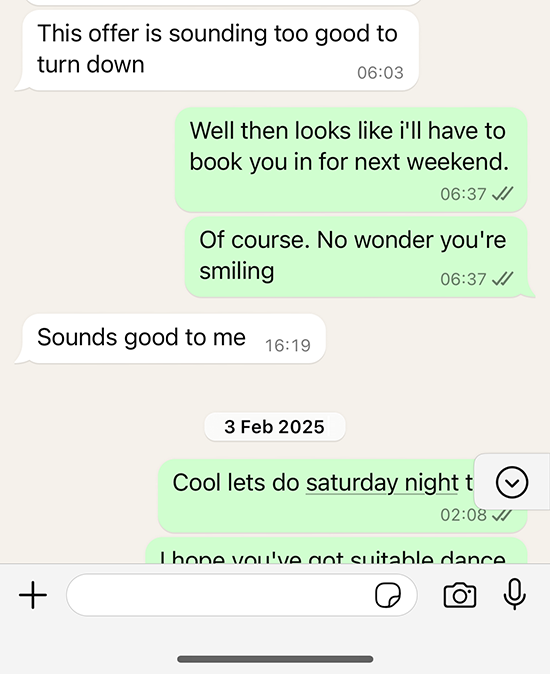
If this happens, don’t worry. You can either crop the image before uploading it to Options AI…
Or you can manually add, edit, or delete texts on Options AI before you hit ‘Analyze Chat’.
Simply tap the  pencil icon to edit a text, or tap the
  icon to add an extra text. You can also add texts in between previous texts.
Here’s how to edit a text:
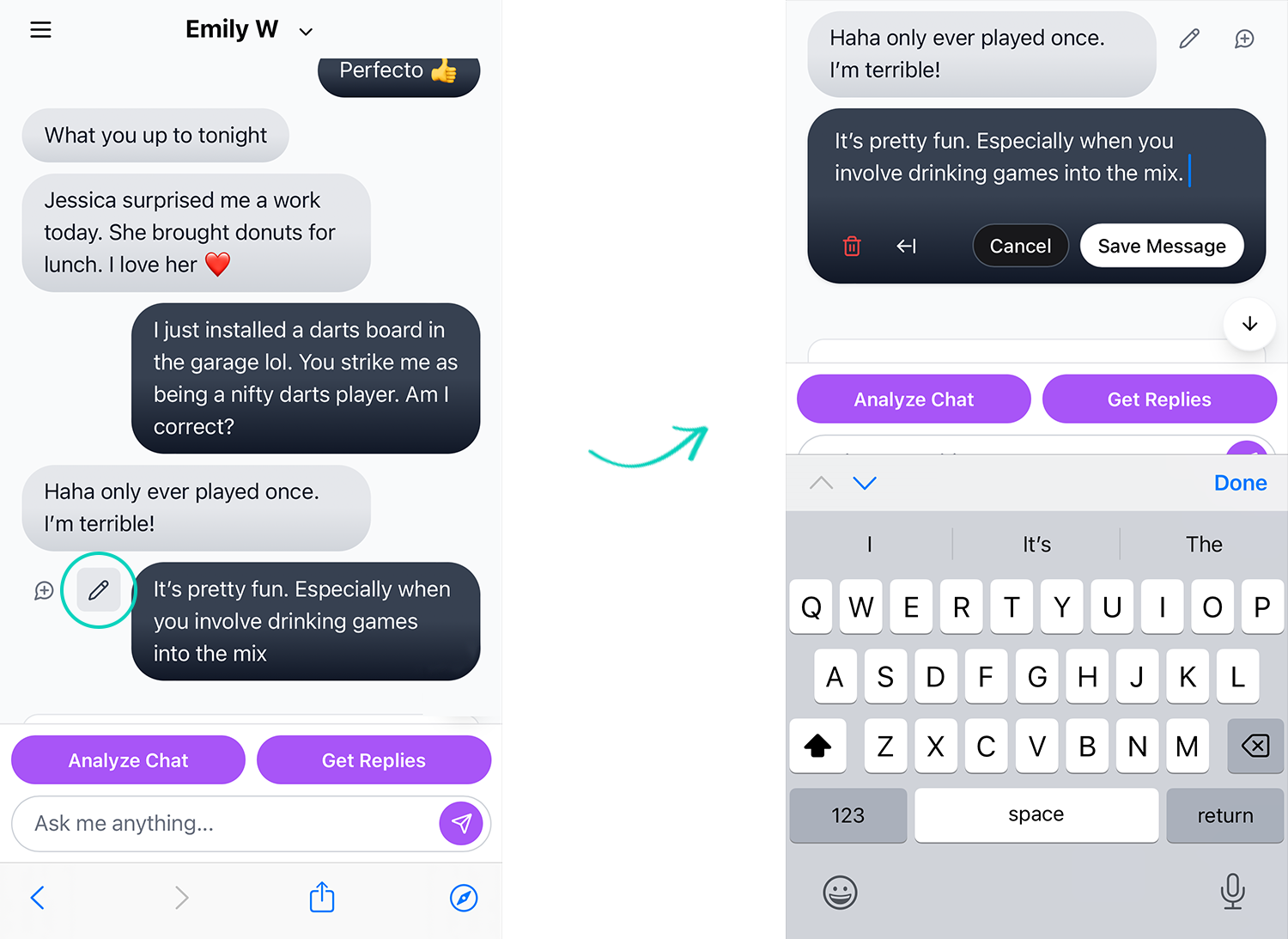
You can delete a text by tapping the  trash can icon (seen in the screenshot above).
Alternatively, you can manually copy & paste texts from your messenger or dating app into Options AI to populate the conversation.
How does the Chat Analysis work?
Our AI analyzes your conversations to provide insights about communication patterns, engagement levels, and potential areas for improvement. This helps you better understand the dynamics of your conversations and what to text her next.
You can ask the AI anything to help you achieve your goals – it will tell you exactly what to say next depending on your situation.
If she’s ghosting you, you want to flirt, make her laugh, or ask her on a date. Options AI has your back.
Using the chat prompt, tell the AI your situation, how long she hasn’t replied, or what date suggestion you have in mind, and let the AI work with you to achieve your goals:

You don’t always have to upload text screenshots with your matches. You can simply use the chat prompt straight away.
For more help on this, please visit the quick start guide to discover how to make the most out of the app and utitlize it’s powerful AI.
I can’t download Options AI from the AppStore or Google Play?
Options AI is a web app, it’s not something you download from the App Store or Google Play. But a web app is effectively the exact same thing.
When using Options AI, make sure to bookmark it to your web browser ‘favourites’, or tap ‘Add to Home Screen’ on your phone so you can access it like all your other favourite Apps.
For more quick tips to make the most out of Options AI, please visit the quick start user guide here: optionsapp.com/quick-start-guide/
Still can’t find the help you need?
If you still can’t find a solution to a problem, or you’d prefer to speak to a human, please email us directly at: support@optionsapp.com and one of our dedicated support team will get back to you.
PLEASE NOTE: If you email us outside of normal business hours (9 AM – 5 PM EST, Mon – Fri), the wait for an initial response may be longer than usual. If it’s a weekend, we will get back to you on Monday.
For more help using the app, please visit the Options AI quick start guide.
And please see our Terms & Conditions for any further information.
Provide feedback, or report a bug
If you have any recommendations for us to improve the app, or you want to report a bug you’re experiencing, please get in touch. We’d love to hear from you.
Email us: support@optionsapp.com
Our dev team will fix any issues, and level up the app pronto 🙂
Thank you for your patience and support.
The Options AI Team